
Your first tax return as a freelancer feels very different from the ones you filed as an employee. There’s no W-2 with everything already calculated, no employer withholding tax from each paycheck, and suddenly there are forms with names like Schedule C and Schedule SE.
The good news: once you understand the order of the process, it’s very manageable. Most freelancers with a simple business can file their own return with tax software in an afternoon, as long as their records are in order.
This guide walks you through the whole process, from gathering documents to submitting your return and setting up next year so April is never a surprise again.
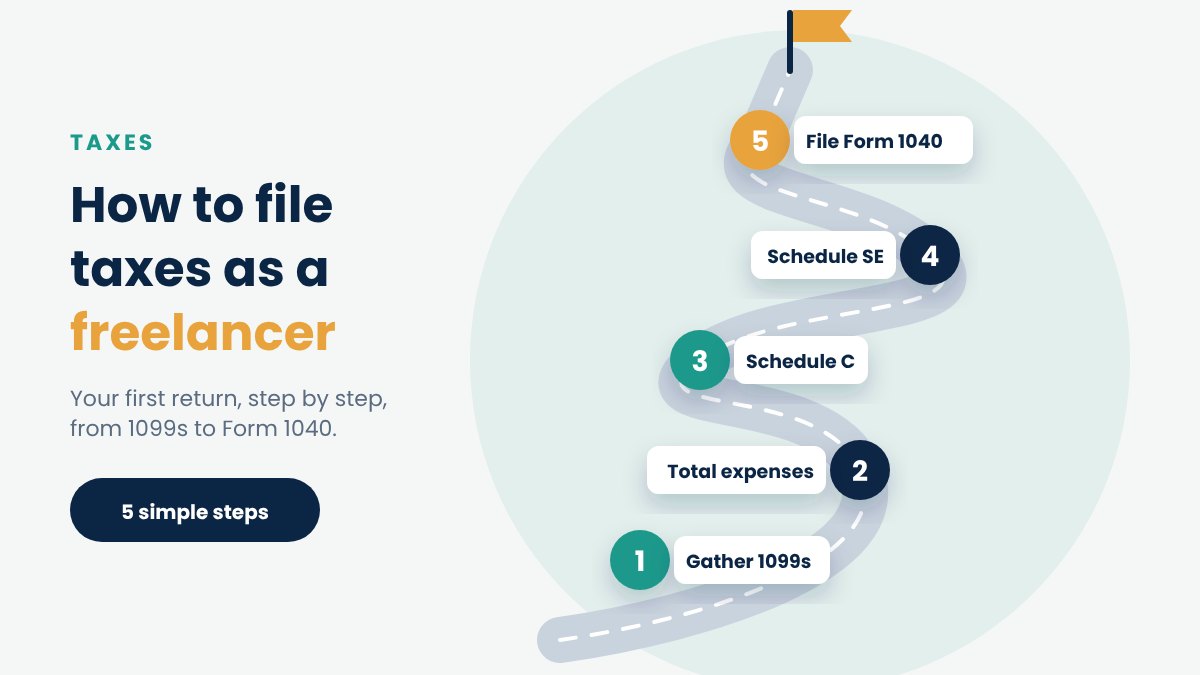
Quick answer: to file taxes as a freelancer, you (1) add up all your business income, (2) subtract your business expenses on Schedule C to get your net profit, (3) calculate self-employment tax on Schedule SE, (4) carry both results to Form 1040 through Schedules 1 and 2, (5) subtract any estimated payments you already made and (6) file by the deadline, which for tax year 2026 is April 15, 2027.
Before you start: are you actually self-employed?
For tax purposes, you’re self-employed if you run a business or offer services on your own account rather than as an employee. That includes:
- Freelancers and independent contractors
- Gig workers on rideshare, delivery and task apps
- Consultants, coaches and creatives who invoice clients
- Owners of a sole proprietorship or single-member LLC (unless it has elected S-Corp status)
The clearest sign is how you’re paid. Employees get a W-2 and have taxes withheld. Self-employed people typically get paid in full, with no withholding, and may receive a 1099 form instead.
If you have both a job and freelance income, you’ll file one return that includes both. The steps below still apply; you’ll simply add your W-2 as well. For the details, see our guide to side hustle taxes with a full-time job.
The forms you’ll use
| Form | What it does | Who needs it |
|---|---|---|
| Form 1040 | Your main individual tax return | Everyone |
| Schedule C | Calculates your business profit or loss | Sole proprietors and single-member LLCs |
| Schedule SE | Calculates self-employment tax | Anyone with $400+ in net self-employment earnings |
| Schedule 1 | Adds business income and takes adjustments like half of SE tax | Most freelancers |
| Schedule 2 | Adds self-employment tax to your total tax | Most freelancers |
| Form 8995 | Claims the Qualified Business Income (QBI) deduction | Most freelancers with a profit |
| Form 8829 | Calculates the home office deduction (regular method) | Only if you use the regular method |
Tax software fills these in for you once you answer its questions. It’s still worth knowing what each one does so you can check the result makes sense.
Step 1: Gather every record of income
Your return must include all your self-employment income, not just what appears on forms. Start by collecting:
- Form 1099-NEC from clients who paid you directly. For payments made in 2026, clients only have to send one if they paid you $2,000 or more during the year (the threshold was $600 until 2025).
- Form 1099-K from payment platforms such as PayPal, Stripe or Venmo business accounts. Federally, these are required only if you received more than $20,000 across more than 200 transactions, although some states set lower thresholds and platforms may send one anyway.
- Form 1099-MISC for certain other payments, such as prizes or rent.
- Platform earnings statements from apps like Uber, DoorDash or Upwork, even if no 1099 was issued.
- Your own invoices and bank deposits, which are the most complete record of what you actually earned.
The rule first-timers miss: a 1099 is only a report. With the higher thresholds from 2026, many freelancers will receive fewer forms than before, but every dollar of income is still taxable, with or without a form. Always build your income total from your own records and use the 1099s to cross-check.
Also make sure you don’t double-count. If a client paid you through a platform, the same payment might appear on both a 1099-NEC and a 1099-K. Report it once and keep a note explaining the overlap.
Step 2: Gather your business expenses
Every legitimate business expense lowers both your income tax and your self-employment tax, so this step directly saves you money. Pull together:
- Bank and credit card statements for the year
- Receipts and invoices for purchases
- Subscriptions (software, cloud storage, tools)
- Equipment you bought (computer, camera, phone)
- Phone and internet bills (the business-use portion)
- Mileage log or vehicle expense records
- Home office measurements if you work from a dedicated space at home
- Fees paid to platforms, payment processors and marketplaces
- Professional services (accountant, lawyer, designer)
- Health insurance premiums if you paid your own
If you haven’t tracked expenses during the year, go through your statements line by line now and mark everything business-related. It’s tedious, but it’s often worth thousands of dollars. Our complete list of freelancer tax deductions shows what you can claim.
Step 3: Collect your personal information
This part is the same as any tax return:
- Your Social Security number (and your spouse’s and dependents’, if applicable)
- Your filing status: single, married filing jointly, married filing separately or head of household
- Any W-2s from jobs, plus other income forms (interest, dividends, unemployment)
- Last year’s tax return, which your software can often import
- Records of any estimated tax payments you made during the year, with dates and amounts
- Your bank account and routing number for a direct-deposit refund or direct debit payment
If you have an EIN (Employer Identification Number) for your business, have it handy too. Many sole proprietors don’t need one; see do you need an EIN as a freelancer?
Step 4: Complete Schedule C (your business profit)
Schedule C is the core of a freelancer’s return. It works like a simple profit and loss statement:
- Gross receipts: all the income from Step 1.
- Returns and cost of goods sold: only relevant if you sell physical products.
- Expenses: grouped into categories such as advertising, car expenses, contract labor, insurance, office expenses, supplies, travel, meals and utilities.
- Home office: entered separately, using either the simplified method or Form 8829.
- Net profit or loss: income minus expenses. This number (line 31) drives almost everything that follows.
A few practical points:
- Use the cash method unless you have a reason not to. Most freelancers report income when they receive it and expenses when they pay them.
- Choose a business code that describes your work. Your software will offer a list.
- Keep expenses in the right category. For example, meals are generally 50% deductible and go on their own line, not under “supplies”.
- If you had two different businesses, such as freelance design and a delivery side gig, you generally file a separate Schedule C for each.
Step 5: Calculate self-employment tax on Schedule SE
Schedule SE takes your net profit from Schedule C and calculates the Social Security and Medicare tax you owe as a self-employed person: 15.3% on 92.35% of your net earnings, up to the Social Security limit.
This is the step that surprises most first-timers. Even if your income is low enough that you owe little or no income tax, you’ll still owe self-employment tax once your net earnings reach $400. For a full breakdown with examples, read self-employment tax explained.
Step 6: Claim your adjustments and deductions
Before income tax is calculated, freelancers can reduce their income with several valuable deductions. Your software will ask about each of these:
- Half of your self-employment tax. Calculated automatically from Schedule SE and taken on Schedule 1.
- Self-employed health insurance deduction. If you paid your own health insurance premiums and weren’t eligible for an employer plan, you can usually deduct them. See our guide to the self-employed health insurance deduction.
- Retirement contributions. Contributions to a SEP IRA can generally still be made up until your filing deadline (including extensions) and count for the previous year. See our comparison of SEP IRA vs Solo 401(k) vs Roth IRA.
- QBI deduction. Most freelancers can deduct up to 20% of their qualified business income on Form 8995, subject to limits. See our guide to the QBI deduction for freelancers.
- Standard or itemized deduction. Most freelancers take the standard deduction, which for 2026 is $16,100 for single filers and $32,200 for married couples filing jointly.
Step 7: Finish Form 1040 and apply your payments
Your software now brings everything together on Form 1040:
- Total income (including your Schedule C profit)
- Minus adjustments (half of SE tax, health insurance, retirement)
- Minus standard deduction and QBI deduction
- Income tax on the result, using the tax brackets
- Plus self-employment tax from Schedule 2
- Minus credits you qualify for
- Minus estimated tax payments and any withholding
The result is either a balance due or a refund.
Double-check that every estimated payment you made during the year is included. Missing one is a common mistake that makes it look like you owe far more than you do. If you’re not sure what you paid, you can check your payment history in your IRS online account.
Step 8: File your state return
Most states have an income tax and require a separate return. Tax software usually prepares it alongside your federal return for an extra fee. A few things to check:
- States without income tax don’t require an individual income tax return.
- Some cities and counties have their own income or business taxes.
- If you worked in more than one state, or moved during the year, you may need to file more than one state return.
Step 9: Submit and pay (or collect your refund)
E-filing is faster, more accurate and gets refunds out sooner than paper returns. All major tax software can e-file for you.
If you owe money, you have several options:
- Direct debit from your bank account when you e-file
- IRS Direct Pay from your bank account, free of charge
- Debit or credit card through an IRS-approved processor (a fee applies)
- A payment plan if you can’t pay in full; interest and penalties continue to apply until the balance is paid
Can’t finish in time? Form 4868 gives you an automatic extension to file until mid-October. It’s an extension to file, not to pay: you still need to estimate and pay what you owe by the April deadline to avoid penalties and interest.
Step 10: Set up next year so April is easier
The most important step for a first-time freelancer happens after you file. Because nobody withholds tax from your income, the IRS generally expects you to pay during the year through quarterly estimated taxes if you expect to owe $1,000 or more.
Use this year’s return as your starting point:
- Look at your total tax. Paying at least 100% of it (110% if your AGI was above $150,000) in four installments next year generally protects you from underpayment penalties, even if you earn more. This is known as the safe harbor rule.
- Put 25–30% of every client payment into a separate savings account the day it arrives.
- Open a separate bank account for your business so next year’s records build themselves. Compare options in our guide to the best business bank accounts for freelancers.
- Track expenses monthly with an app or spreadsheet instead of reconstructing them in March.
Our guide to quarterly estimated taxes for freelancers explains how to calculate and pay each installment.
Key deadlines for tax year 2026
| Date | What’s due |
|---|---|
| Early February 2027 | Clients and platforms send 1099 forms |
| January 15, 2027 | Fourth estimated tax payment for 2026 |
| April 15, 2027 | Tax return due and any balance owed; first estimated payment for 2027 |
| April 15, 2027 | Last day to request an extension (Form 4868) |
| October 15, 2027 | Extended filing deadline |
Dates can shift slightly when a deadline falls on a weekend or holiday. Always confirm on the IRS website or in our estimated tax due dates guide.
Should you use software, an accountant or file for free?
| Option | Typical cost | Best for |
|---|---|---|
| IRS Free File | Free | Freelancers under the income limit with a simple business |
| Tax software (self-employed tier) | Around $100–$250 for federal + state | Most freelancers with one business and organized records |
| Enrolled Agent or CPA | Often $300–$1,000+ for a return with Schedule C | Multiple businesses, S-Corp questions, a messy year, IRS letters |
Tax software works well for most first-timers if you already have your income and expenses organized. Consider a professional if you had several income streams, moved states, want to explore an S-Corp, or simply don’t want to risk getting it wrong in your first year. The fee for preparing the business portion of your return is itself a deductible business expense.
Compare the options in our guide to the best tax software for freelancers and 1099 workers.
Freelancer tax filing checklist
Before you start your return, make sure you have:
- All 1099-NEC, 1099-K and 1099-MISC forms
- Platform earnings statements
- Your own income total from invoices or bank deposits
- Business bank and credit card statements
- Receipts for major purchases
- Mileage log or vehicle records
- Home office square footage (office and total home)
- Health insurance premiums paid
- Retirement contributions made or planned
- Dates and amounts of estimated tax payments
- W-2s and other personal tax forms
- Last year’s tax return
- Bank details for refund or payment
Common first-timer mistakes
- Only reporting income that appears on a 1099. The IRS expects all income to be reported, and missing forms don’t change that.
- Forgetting self-employment tax. Budgeting only for income tax leads to a much bigger bill than expected.
- Mixing personal and business expenses. Personal costs aren’t deductible, and blending the two makes your records harder to defend.
- Missing deductions. Platform fees, software, phone and internet are easy to overlook, and each one reduces two taxes at once.
- Double-counting income that appears on both a 1099-NEC and a 1099-K.
- Not claiming estimated payments already made during the year.
- Filing an extension and not paying. Penalties and interest start from the April deadline.
- Throwing away records. Keep your return and supporting documents for at least three years, and longer for records related to assets like equipment.
Frequently asked questions
Do I have to file taxes if I only freelanced a little?
If your net earnings from self-employment were $400 or more, you generally must file a return and pay self-employment tax, even if your total income is below the usual filing threshold. Below $400, you may still need to file for other reasons, such as other income or to claim a refund.
What if I didn’t receive a 1099?
You still have to report the income. From 2026, clients only need to send a 1099-NEC if they paid you $2,000 or more, and payment platforms only need to send a 1099-K above $20,000 and 200 transactions. Use your invoices and bank records to calculate your total.
Can I file freelance taxes myself?
Yes. Many freelancers with a single business and organized records file with tax software. A professional is worth considering if your situation is more complex or you want peace of mind in your first year.
When are freelance taxes due?
For tax year 2026, your annual return is due April 15, 2027. Most freelancers are also expected to make quarterly estimated payments during the year.
What happens if I can’t pay what I owe?
File on time anyway, because the penalty for not filing is generally much higher than the penalty for not paying. Pay as much as you can, then apply for an IRS payment plan for the remaining balance.
Do I need an LLC to file as a freelancer?
No. You can file as a sole proprietor using your Social Security number. A single-member LLC is taxed the same way by default and also reports on Schedule C. See LLC vs sole proprietor for freelancers.
Key takeaways
- Freelancers report business income and expenses on Schedule C and pay self-employment tax on Schedule SE, both attached to Form 1040.
- Report all income, even without a 1099. From 2026, fewer forms will arrive because of the higher reporting thresholds.
- Every legitimate business expense lowers both income tax and self-employment tax.
- The tax year 2026 return is due April 15, 2027. An extension gives you more time to file, not to pay.
- After your first return, set up quarterly payments and a separate tax savings account so next year is simpler.
This article is for general educational purposes and is not tax, legal or financial advice. Tax rules change and your situation may differ. Consult a CPA or Enrolled Agent before making decisions. Figures are for tax year 2026 and are based on IRS published amounts.